
JavAlert
by Ryvione
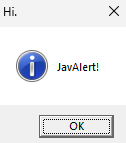
With JavAlert, a server owner can push a native alert to a player's desktop, outside the game window, using the operating system's notification system.
What it does
JavAlert sends alerts to players through the system notifications of Windows, macOS and Linux, and can also open native dialog boxes or custom in-game alert screens with buttons. An alert beacon block fires an alert when a player enters its detection radius, and conditional triggers can start one based on inventory contents, stats, location or biome. Alert configurations can be saved and reused, and the text is available in English, Spanish, French and German. Server owners often use it for announcements, quest steps and automated interactions between players.
The mod is published for Forge and NeoForge, with files for 1.20.1 and 1.21.1. Its current builds are version 1.2.1 for 1.20.1 and 1.2.1 for 1.21.1, both on the beta channel and dated 2026-09-14. JavAlert runs on client and server, so both the server and every player need the mod. It is licensed as All rights reserved, so it is not open source. An API is available for mod developers who want to trigger alerts from their own code, and the configuration screen opens from a JavAlert Config button in the main menu, next to the Singleplayer button.
Key features
Native system notifications
Alerts appear as real operating system notifications, so they show up even when the game window is not in front.
Native dialog boxes
Message boxes open as native dialogs on Windows, macOS and Linux, for alerts that need an answer.
Custom in-game screens
Alert screens with buttons can be built inside the game, for prompts that stay within Minecraft.
Alert beacon block
A beacon block triggers an alert automatically when a player enters its detection radius.
Conditional triggers
Alerts can fire based on inventory contents, stats, location or biome, not only on manual use.
Saved configurations
Alert setups can be saved and loaded again, so the same message does not need to be rebuilt.
Compatibility
Latest build for each game version and loader.
Only full game releases are shown. This mod publishes no snapshot builds.
How it compares
Magpie Bridge Notification is a client-side only mod for Fabric and Forge, published for 1.20 – 1.21.11 and licensed as All rights reserved, so it is not open source. StreamCraft Live runs on client and server for Fabric, Forge, NeoForge and Quilt, covering 1.20.1 – 26.3, and is also licensed as All rights reserved. Chat Notify is client-side only, open source under the Apache License 2.0, and available for Fabric, Forge, NeoForge and Quilt across 1.19.3 – 26.3.
| Mod | Loaders | Game versions | Environment | Updated |
|---|---|---|---|---|
| JavAlert | Forge and NeoForge | 1.20.1 – 1.21.1 | Client and server | 2026-09-14 |
| Magpie Bridge Notification | Fabric and Forge | 1.20 – 1.21.11 | Client-side only | 2026-06-14 |
| StreamCraft Live | Fabric, Forge, NeoForge and Quilt | 1.20.1 – 26.3 | Client and server | 2026-10-12 |
| Chat Notify | Fabric, Forge, NeoForge and Quilt | 1.19.3 – 26.3 | Client-side only | 2026-10-09 |
Questions
Which loaders does JavAlert support?
Does JavAlert have to be installed on the server?
Are the alerts available in several languages?
In the catalog
JavAlert is one of 5,392 Social mods on ModsFinder, and one of 1,817 Social mods for Forge. 32,366 mods support Minecraft 1.21.1.
More from Ryvione

Similar mods






What the author says
Send native OS alerts and notifications to players! Perfect for trolling friends, server announcements, quest systems, and automated interactions. Alerts appear outside the game as real system notifications on Windows, macOS, and Linux. Access configuration via the "JavAlert Config" button on the main menu (icon next…
Official listing
- Modrinth page
- modrinth.com/mod/javalert
- Owner
- Ryvione
- Published
- 2025-11-22
- Updated on Modrinth
- 2026-09-14
- Facts verified
- 2026-10-15