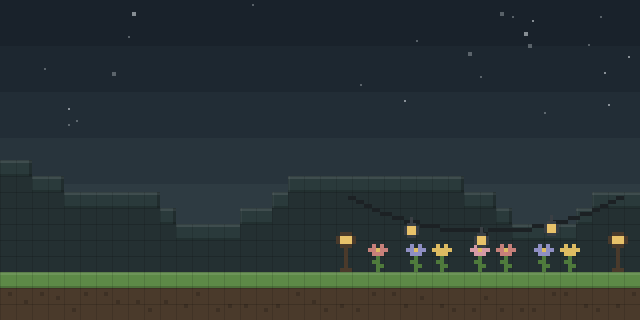

Fishing Line
by NymNux
Fishing Line lets players set a custom color for the fishing line of their rod, with a palette editor that saves named profiles.
What it does
The mod changes only how a fishing line is drawn. A player picks a color in a configuration screen opened from the Mod Menu button, names the profile and saves it, and the chosen color then shows on the line each time the rod is cast. Color stops along the line can be placed to build gradients that change along its length, which the mod calls dynamic key frames.
The palette editor works with the mouse: a left click paints a color onto a slot, a right click erases it and a middle click picks a color from the slot under the cursor. Empty slots are filled automatically through NearestHSB, a hue-based matching step. The line is split into one extra segment, so it is drawn with 18 nodes instead of the 17 used in vanilla Minecraft, which gives the color gradients more points to follow.
Fishing Line needs Bland UI, Mod Menu and YetAnotherConfigLib (YACL) to be installed alongside it. The mod is published for Fabric only, for game versions 26.1.2 – 26.2, and the latest file is 26.3+26.2 for 26.2, released 2026-10-05. It runs on the client alone, and the code is released under the MIT License, but it is not open source.
Key features
Custom line colors
The fishing line of a rod takes a color chosen by the player, instead of the default vanilla line color.
Dynamic key frames
Color stops placed along the line create gradients that change from one end of the line to the other.
Named color profiles
Palettes are saved under a custom name, so a player can keep several looks and switch between them.
Mouse-driven palette editor
Left click paints a slot, right click erases it and middle click picks a color, all within the configuration screen.
Automatic slot filling
Empty color slots are filled through NearestHSB, so a partly filled palette still produces a usable gradient.
Gallery
Compatibility
Latest build for each game version and loader.
Only full game releases are shown. This mod publishes no snapshot builds.
Requirements
Dependencies declared by the latest file for each loader.
Required 3



How it compares
Hiddenframes is a Fabric and NeoForge mod for client and server, under All rights reserved, with files for 26.2 – 26.3, so it works on servers that run NeoForge. RGB Paintbrush is a client and server Fabric mod under the MIT License, but its files cover only 1.21.1 and it is not open source. Item Frame Color is published for Fabric, Forge, NeoForge and Quilt across 1.19 – 1.21.4, with a server-required environment and a Creative Commons Attribution Non Commercial 4.0 license. None of these three changes fishing lines, so they fit other item and frame coloring needs.
| Mod | Loaders | Game versions | Environment | Updated |
|---|---|---|---|---|
| Fishing Line | Fabric | 26.1.2 – 26.2 | Client-side only | 2026-10-05 |
| Hiddenframes | Fabric and NeoForge | 26.2 – 26.3 | Client and server | 2026-09-20 |
| RGB Paintbrush | Fabric | 1.21.1 | Client and server | 2026-05-16 |
| Item Frame Color | Fabric, Forge, NeoForge and Quilt | 1.19 – 1.21.4 | Server required, client optional | 2025-02-20 |
Questions
Does Fishing Line need Fabric API?
Does Fishing Line have to be installed on the server?
Which game versions does Fishing Line support?
In the catalog
Fishing Line is one of 12,078 Decoration mods on ModsFinder, and one of 6,982 Decoration mods for Fabric. 13,894 mods support Minecraft 26.2.
More from NymNux


Similar mods





What the author says
- open config menu via ModMenu - Config Entries -> click "+" on the top right -> enter a custom name to create a profile - click the button with custom name to config the profile with a simple user interface - left click to paint, right click to erase and middle click to pick color - click the "+" button on the left…
Official listing
- Modrinth page
- modrinth.com/mod/fishing-line
- Owner
- NymNux
- Published
- 2026-08-09
- Updated on Modrinth
- 2026-10-05
- Facts verified
- 2026-10-15