
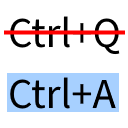
Universal Shortcuts (Ctrl A fix)
by MDLC01
Universal Shortcuts fixes Minecraft bug MC-121278, which stops Ctrl+A and other keyboard shortcuts from working on non-QWERTY keyboard layouts.
What it does
On keyboards that use layouts other than QWERTY, the standard Ctrl shortcuts can fail in Minecraft because the game reads the physical key rather than the character printed on it. Universal Shortcuts makes the common combinations respond to the character a player actually types, so Ctrl+A selects, and the other clipboard and editing shortcuts act as expected in text fields and chat.
The fix covers the core editing set: select all with Ctrl+A, copy with Ctrl+C, paste with Ctrl+V and cut with Ctrl+X. It also handles the debug key combinations, so layout-dependent shortcuts behave the same way in those menus. The change affects client input only and does not alter gameplay or world data.
Installation needs Fabric. Universal Shortcuts is published for Fabric alone, across 20 release versions 1.19.4 – 1.21.11, and is released under the WTFPL, so the code is not open source. The source code and issue tracker are public.
Key features
Layout-independent Ctrl+A
Select all works on keyboard layouts other than QWERTY, where the game's default binding previously failed.
Clipboard shortcuts
Copy, paste and cut respond to Ctrl+C, Ctrl+V and Ctrl+X on non-QWERTY layouts, in text fields and the chat box.
Debug key combinations
The debug shortcuts follow the typed character too, so they work on layouts where the default keys were out of reach.
Input-only change
The mod changes how keys are read and leaves gameplay, worlds and saved data untouched.
Compatibility
Latest build for each game version and loader.
1.21.x12 of 12 versions with builds
1.20.x7 of 7 versions with builds
1.19.x1 of 1 version with builds
Only full game releases are shown. This mod publishes no snapshot builds.
Use cases
Typing on a non-English keyboard
A player whose keyboard layout puts letters in different places can use Ctrl+A and the clipboard keys in chat and signs without rebinding anything.
Who it’s for: Players on keyboard layouts other than QWERTY who find that Ctrl shortcuts do not respond in Minecraft. The mod is installed on the client only.
How it compares
Fix Keyboard on Linux is a Fabric client mod for 1.18.2 – 1.21.11 under the MIT License and is open source, so its code can be inspected. Better Clipboard is also Fabric and client-side only, for 1.20.2 – 26.3, but its license is All rights reserved and it is not open source. Use My Keyboard is a Fabric client mod for 1.21.8 under a custom license and is not open source.
| Mod | Loaders | Game versions | Environment | Updated |
|---|---|---|---|---|
| Universal Shortcuts (Ctrl A fix) | Fabric | 1.19.4 – 1.21.11 | Client-side only | 2025-12-13 |
| Fix Keyboard on Linux | Fabric | 1.18.2 – 1.21.11 | Client-side only | 2025-09-28 |
| Better Clipboard | Fabric | 1.20.2 – 26.3 | Client-side only | 2026-09-15 |
| Use My Keyboard | Fabric | 1.21.8 | Client-side only | 2025-08-29 |
Questions
Does Universal Shortcuts need to be on the server?
Which loader does Universal Shortcuts use?
Which game versions are supported?
In the catalog
Universal Shortcuts (Ctrl A fix) is one of 36,990 Utility mods on ModsFinder, and one of 25,772 Utility mods for Fabric. 19,862 mods support Minecraft 1.21.11.
More from MDLC01
Similar mods





What the author says
By implementing the fix that is suggested on the bug report for MC-121278. That is, testing for the key name instead of its location on the keyboard.
Official listing
- Modrinth page
- modrinth.com/mod/universal-shortcuts
- Owner
- MDLC01
- Published
- 2023-04-12
- Updated on Modrinth
- 2025-12-13
- Facts verified
- 2026-10-15