
Simplest Hud
by waqst
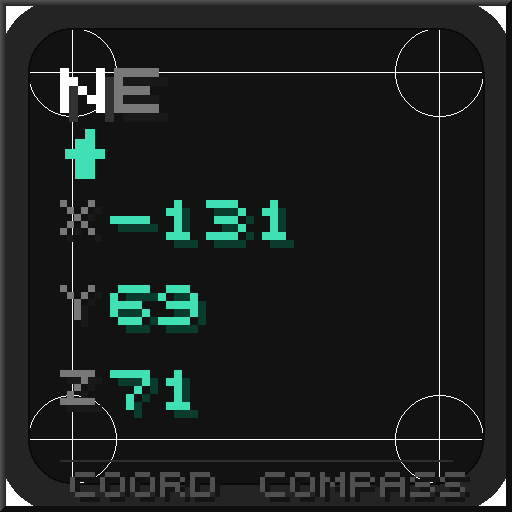
Simple HUD puts a small text overlay on the game screen, showing coordinates, facing direction, FPS, biome and dimension in corners that players can adjust.
What it does
Players who need a readout without the F3 debug screen can enable individual elements. The default layout shows current coordinates and a compass direction in the top-left corner, and the layout can be changed to a two-line display with the direction above the coordinates. Each element can be turned off, so a player who only watches the Y level while caving can keep just that value on screen.
Simple HUD is a client-side only Fabric mod, so servers do not need it and players join without installing it. It requires Cloth Config and Fabric API, both of which must be installed next to it. The MIT License covers the code, which is not open source, and the mod is published for 1.21.11 only.
Key features
Coordinates in real time
X, Y and Z update on screen as the player moves, with 0, 1 or 2 decimal places selectable.
Facing direction
Four styles are available: short letters, long names, degrees from 0 to 359, or a short and degree mix such as SE 135.
Biome and dimension
The current biome is shown with a readable name, such as Dark Forest for minecraft:dark_forest, and the dimension is shown as Overworld, Nether or End.
Frames per second
A plain FPS readout stays up to date and can be switched off for players who do not want it.
Custom format strings
Advanced users can write their own format string with placeholders instead of using the built-in toggles.
Gallery
Compatibility
Latest build for each game version and loader.
Only full game releases are shown. This mod publishes no snapshot builds.
Requirements
Dependencies declared by the latest file for each loader.
Required 2


Use cases
Speedrunning and exploration
A small overlay keeps coordinates visible while moving through far-out terrain, without opening a menu.
Building large structures
Players locating a specific block or aligning a build can read exact positions while looking at the work.
Who it’s for: Players who want a compact, configurable overlay instead of the full debug screen, and server players who do not want to install anything on the server.
How it compares
Coords HUD is also a client-side only Fabric mod for 1.21.11, released under CC0 1.0 Universal, so it can be used on the same version. Simple Compass HUD is client-side only and published for 1.21.6 – 1.21.8 under the MIT License, so it covers an older range than Simple HUD.
| Mod | Loaders | Game versions | Environment | Updated |
|---|---|---|---|---|
| Simplest Hud | Fabric | 1.21.11 | Client-side only | 2026-06-22 |
| Coords HUD | Fabric | 1.21.11 | Client-side only | 2026-09-03 |
| Simple Compass HUD | Fabric | 1.21.6 – 1.21.8 | Client-side only | 2025-08-23 |
Questions
Does Simple HUD need Fabric API?
Does the server need Simple HUD?
Which Minecraft versions does Simple HUD support?
In the catalog
Simplest Hud is one of 19,031 Adventure mods on ModsFinder, and one of 10,052 Adventure mods for Fabric. 19,862 mods support Minecraft 1.21.11.
Similar mods





What the author says
Simple HUD is a lightweight, fully customizable heads-up display mod for Minecraft 1.21.11 (Fabric) that puts all the information you actually need right on your screen — without the clutter of the F3 debug menu. Whether you're speedrunning, building massive structures, exploring far-out coordinates, or just playing…
Official listing
- Modrinth page
- modrinth.com/mod/simplest-hud
- Owner
- waqst
- Published
- 2026-06-22
- Updated on Modrinth
- 2026-06-22
- Facts verified
- 2026-10-15