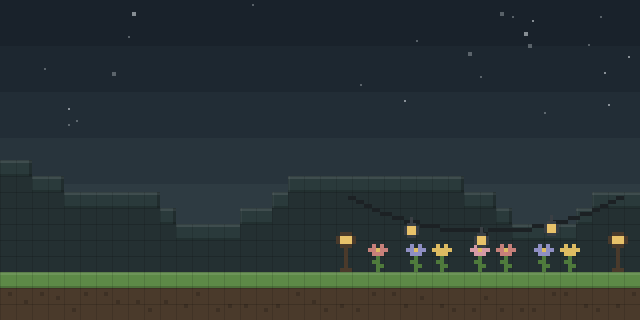

Ancient Night Sky
Ancient Night Sky changes the sky color to dark blue in the classic Minecraft alpha builds rd-132211 and rd-132328.
What it does
The mod replaces the daytime sky tint with a dark blue shade in two release versions, rd-132211 and rd-132328. It is a client-side only change, so players install it on their own game and servers do not need it. Because it runs through a Java Agent and ModLoader, it is set up by adding the agent in the launcher rather than dropping a jar into a mods folder.
Key features
Dark blue sky
The sky color shifts to a dark blue across both supported alpha builds, changing the look of outdoor scenes.
Launcher agent setup
The mod is added through the Java Agent option in the launcher's version settings, then enabled before the game starts.
Instance creation
A new instance is created for the alpha build, with the Alphas box ticked so older versions appear in the list.
Gallery
Questions
Does Ancient Night Sky need to be installed on the server?
Which game versions does Ancient Night Sky support?
How is Ancient Night Sky added to the game?
In the catalog
Ancient Night Sky is one of 12,078 Decoration mods on ModsFinder. 37 mods support Minecraft rd-132328.
More from KilobyteNight

What the author says
Select the Version tab on the left. Click Add Agents on the right, and then select the downloaded mod. The Ancient Night Sky mod should appear in the versions list, and pressing launch will start the game with the mod enabled. Under MORE OPTIONS add "-javaagent:path/to/mod.jar" to the end of the JVM ARGUMENTS. Ensure…
Official listing
- Modrinth page
- modrinth.com/mod/ancientnightsky
- Owner
- KilobyteNight
- Published
- 2026-06-14
- Updated on Modrinth
- 2026-07-19
- Facts verified
- 2026-10-15